Choose Which Site You Want To See




Skype is a communications platform offering voice calls, video conversations, and messaging tools for personal and workplace use.
It provides a familiar environment for staying in contact across devices, with features that can support both casual chats and more structured discussions. The service may suit individuals seeking an accessible way to connect with friends, family, or colleagues, and can appeal to users who prefer a straightforward interface without complex setup. Its flexible features allow people to communicate in ways that match their preferences.
Skype is a long established communication platform that offers voice calls, video calls, messaging features, and options for connecting with people across different devices. Introduced in the early 2000s and later becoming part of a major global technology group, it has maintained a notable presence within the online communication category. Skype positions itself as a broadly accessible service aimed at personal, professional, and mixed usage scenarios.
Over time, the platform has evolved from its origins as a simple peer to peer calling tool into a cloud based service that supports multi device synchronisation and a structured account system. While other communication platforms have emerged, Skype continues to be recognised for its cross platform reach and familiarity. This long term presence contributes to its role as a mainstream communication option that is used in homes, workplaces, and educational settings. Users often view it as a versatile tool rather than a specialist service, and this shapes the expectations people typically bring to it.
The platform’s extensive history means it is often associated with international calling, remote collaboration, and casual video chat. Its market positioning fits within a mass market communication category, where ease of access, device compatibility, and practical features are emphasised. Because Skype is not designed for any single user type, it is generally approached as a flexible tool that can suit a range of communication needs. People encountering the service today usually expect straightforward functionality, a familiar layout, and integration with wider devices and operating systems. These characteristics contribute to its continued relevance, even as online communication options diversify.
Browse the full range on the Skype website.
This category includes Skype’s one to one and group video call options. Users can start or join video conversations, and features may include camera toggling, screen sharing, and group layouts. Video calling is positioned as a core function and is designed to support both casual and work related communication.
Voice calling features provide audio based conversations between Skype users. This includes one to one calls and group voice discussions. The functionality is often used when users require a lightweight alternative to video calling or when bandwidth is limited.
Messaging includes text based chat that supports sending written messages, files, images, and short reactions. It offers a supplementary communication channel that complements voice and video tools. This category reflects Skype's approach to multi mode communication.
This category includes paid options for calling landlines and mobile numbers in selected countries. It allows users to connect with people who are not using Skype. The availability of these services varies by region and is generally approached as a practical communication supplement.
Group calling supports multiple participants joining voice or video conversations. This is often used for informal gatherings, remote meetings, study groups, and small collaborative sessions. Its positioning reflects Skype's focus on accessible group communication rather than specialised enterprise conferencing.
Screen sharing allows users to display content from their device during calls. This feature is commonly used in work, education, and support related contexts. It is intended to offer clarity and convenience when discussing on screen material.
Skype can be used across multiple device types. This category includes its applications on mobile and desktop operating systems, as well as limited support on some smart devices. This cross device compatibility is part of its broader accessibility focus.
User account tools include profile settings, contact management, notification controls, and privacy features. These elements help users configure Skype to suit their communication preferences and device environment.
This category covers the ability to send documents, images, and media clips through chat. It offers a straightforward method for exchanging materials within personal or collaborative conversations.
Skype Number is an optional paid feature that provides users with a dedicated number in selected regions. This allows people to receive calls from landlines or mobiles through Skype. It is positioned as a practical tool for users needing an additional telephony channel.
Skype positions itself as an accessible communication platform that prioritises ease of use and wide device compatibility. The service operates through a cloud based infrastructure that enables synchronised conversations across multiple devices. Its long established presence contributes to a familiar layout and operational style that many users recognise.
The platform focuses on providing communication tools that can be adapted to personal, social, and informal professional scenarios. Rather than targeting specialist use cases, Skype functions as a general purpose service aimed at flexible communication needs. Its values centre around connectivity and straightforward operation, with an emphasis on helping users stay in touch across distances.
The user interface is designed to be approachable, with clear navigation panels and structured conversations. Users can move between chat, calls, and settings without complex workflows. This contributes to a broadly accessible experience that suits individuals with different levels of technical familiarity.
During onboarding, users typically encounter a simple account setup process, followed by prompts to add contacts or explore call options. The platform offers clear menus and icon based navigation, allowing users to identify features at a glance. Device compatibility and synchronisation support multi device communication without requiring repeated setup.
Skype is known for its voice calling, video calling, and messaging tools. It provides a communication platform that supports a wide range of personal and informal professional interactions. These functions have contributed to its long term presence in the online communication market.
Skype operates through a cloud based service that connects users across different devices. It provides communication features including calls, messaging, file sharing, and optional paid calling services. This operational model allows users to communicate in real time whether they are using desktop or mobile devices.
Skype is typically used by individuals, families, and mixed user groups who want a familiar communication platform. It is also used in some remote work, educational, and informal collaboration settings. Its wide device compatibility makes it accessible to a variety of users.
Skype may be suitable for people who want cross platform communication tools, international contact options, or simple video calls. Suitability depends on user preferences, communication habits, and whether they need features like landline calling or group chat.
Skype offers a broad set of communication features similar to many other platforms, but differentiates itself through long term familiarity and optional calling services. Alternatives may focus on messaging, video conferencing, or collaboration, while Skype maintains a general purpose approach.
Users should know that Skype provides a flexible mix of communication tools and may require an account to access full features. Some calling options are paid services, and functionality can vary depending on device and region. Most users find the layout straightforward and accessible.
Skype continues to be a widely recognised communication service that focuses on accessibility, multi device usage, and long term familiarity. It sits within the mass market category of communication tools, offering functions that include video calls, voice calls, messaging, screen sharing, and optional calling services. This broad feature set allows it to support a wide range of personal and informal professional communication needs without specialising in any single niche.
The platform is conditionally suitable for individuals who want cross platform communication, straightforward navigation, or occasional contact with landline or mobile numbers. Its interface is designed to be approachable, and many users appreciate the consistency that comes with a long established service. While alternatives exist that focus on more specialised collaboration or messaging experiences, Skype maintains a general purpose approach that appeals to diverse user types.
Overall, Skype provides a familiar and flexible communication environment that can integrate into different routines, from everyday conversations to remote collaboration. Its ongoing presence in the communication sector reflects both its adaptability and its broad user base. This longevity contributes to its role as a trusted, recognisable name in online communication.
Ready to shop? See the full range on the Skype website.
This guide was written by AI. It does not represent the views or opinions of the website owner.
Updated October 2026
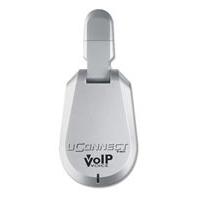
Uconnect Usb Adapter Skype: Bringing endless opportunites to the choice of hardware for use with VoIP, cordless and DECT phones can be connected...
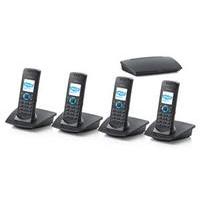
Dualphone 3088 Quad For Skype (no Pc Required): Finally a cordless Skype phone that does not require a PC. Just connect the DUALphone base station to your broadband...
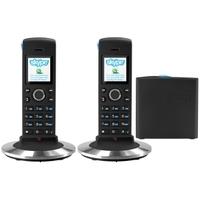
Dualphone 4088 Twin Skype Cordless Phone: Finally a cordless Skype phone that does not require a PC. Just connect the DUALphone base station to your broadband...
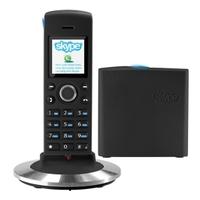
Dualphone 4088 Skype Cordless Phone: Finally a cordless Skype phone that does not require a PC. Just connect the DUALphone base station to your broadband...
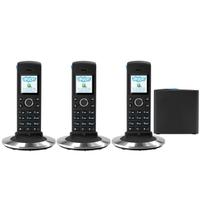
Dualphone 4088 Trio Skype Cordless Phone: Finally a cordless Skype phone that does not require a PC. Just connect the DUALphone base station to your broadband...
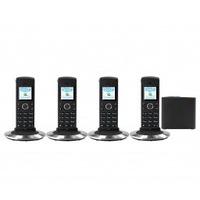
Dualphone 4088 Quad Skype Cordless Phone: Finally a cordless Skype phone that does not require a PC. Just connect the DUALphone base station to your broadband...

Dualphone 4088 Twin Skype Cordless Phone In White: Finally a cordless Skype phone that does not require a PC. Just connect the DUALphone base station to your broadband...

Dualphone 4088 Trio Skype Cordless Phone In White: Finally a cordless Skype phone that does not require a PC. Just connect the DUALphone base station to your broadband...

Dualphone 4088 Quad Skype Cordless Phone In White: Finally a cordless Skype phone that does not require a PC. Just connect the DUALphone base station to your broadband...
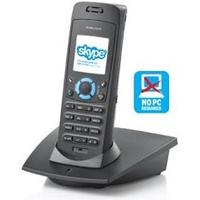
Dualphone 3088 For Skype (no Pc Required): Finally a cordless Skype phone that does not require a PC. Just connect the DUALphone base station to your broadband...
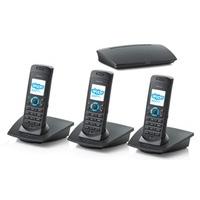
Dualphone 3088 Trio For Skype (no Pc Required): Finally a cordless Skype phone that does not require a PC. Just connect the DUALphone base station to your broadband...
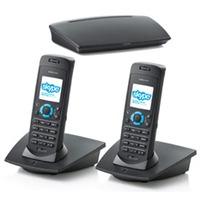
Dualphone 3088 Twin For Skype (no Pc Required): Finally a cordless Skype phone that does not require a PC. Just connect the DUALphone base station to your broadband...
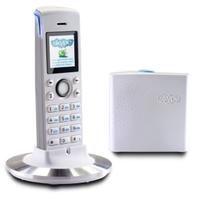
Dualphone 4088 Skype Cordless Phone In White: Finally a cordless Skype phone that does not require a PC. Just connect the DUALphone base station to your broadband...

Skype Phone With Lcd: Skype Phone with LCD The future of telephone calls is here. This Skype certified USB/Skype telephone has an integrated...
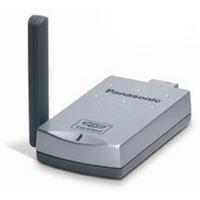
Kx-tga 915 Exs Wireless Skype Adapter For Panasonic 9120 And 9140: KXTGA915EXS Is a USB connector that links your 9120 phone to your PC without any wires at all. Your 9120 phone and all...
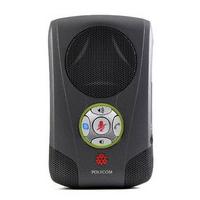
Communicator C100s Skype Deskop Speaker: The Polycom Communicator enables crystal clear, natural conversations when using Skype/IP telephony. Enjoy the freedom...

Hypnotherapy Session Over Skype: This offer is for those who are living far and are unable come to my office in London, Brighton or Manchester. Or if...

Amaryllo Hd Skype Wireless Ip Camera (pink): See your baby and loved ones on smart phones, laptops, PCs, and tablets anywhere, anytime Wireless remote pan and tilt...
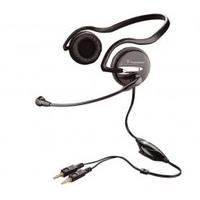
.audio 345 Pc Multimedia Headset With Skype: The Plantronics .Audio 345 is a behind-the-head enhanced multimedia headset with great stereo sound and inline...
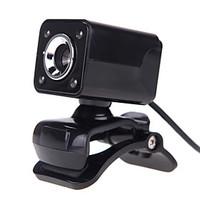
4led Usb 2.0 12 M Hd Camera Web Cam With Mic Clip-on Night Vision 360 Degree For Desktop Skype Computer Pc Laptop: Model:A862; Features:HD Video Calling, Built-in Microphone, Night Vision LED, Skype, Flexible; Style:Novelty; Packing:1...
 4com
 eFax International
 Acefone
 Clocom
 Powwownow
 Pop Telecom
 Webex
 Vonage
 Planet Numbers
 Woav